

How a Real Estate Chatbot Works For Teams & Brokerages


TLDR: Website visitors expect instant engagement outside of business hours. An AI-powered chatbot ensures no lead goes unanswered by qualifying intent, capturing contact info, pushing details directly into your CRM.
We live in an era of instant answers.
When a lead hits your website, their "patience clock" is already ticking. If your website is not engaging or easy to use they will bounce.
If a lead has to navigate through three pages just to answer their question, you’ve already lost them.
Today’s buyers and sellers expect your website to behave like an AI assistant.
If the path to you isn't effortless and immediate, they’ll find a competitor who makes it easy.
Why Leads Go Cold Before You Even Know They Exist
The window for quick engagement and info capturing is much smaller than you think.
And these aren't casual browsers you're losing.
Data from over 5 million Canadian interactions in our 2025 report shows a clear shift toward high-intent behavior. Specifically, two-thirds of users who engaged with Madison are past the exploration phase and nearly four in ten provide an exact property address.
These are active buyers and/or sellers that fly under the radar because your website doesn't have the tools, yet, to start a conversation with them.
So How Does a Real Estate Chatbot Actually Work?
Step 1: Visitor arrives on your website. Could be a listing page, the homepage, or a blog post. The chatbot opens with a greeting immediately getting the user's attention.
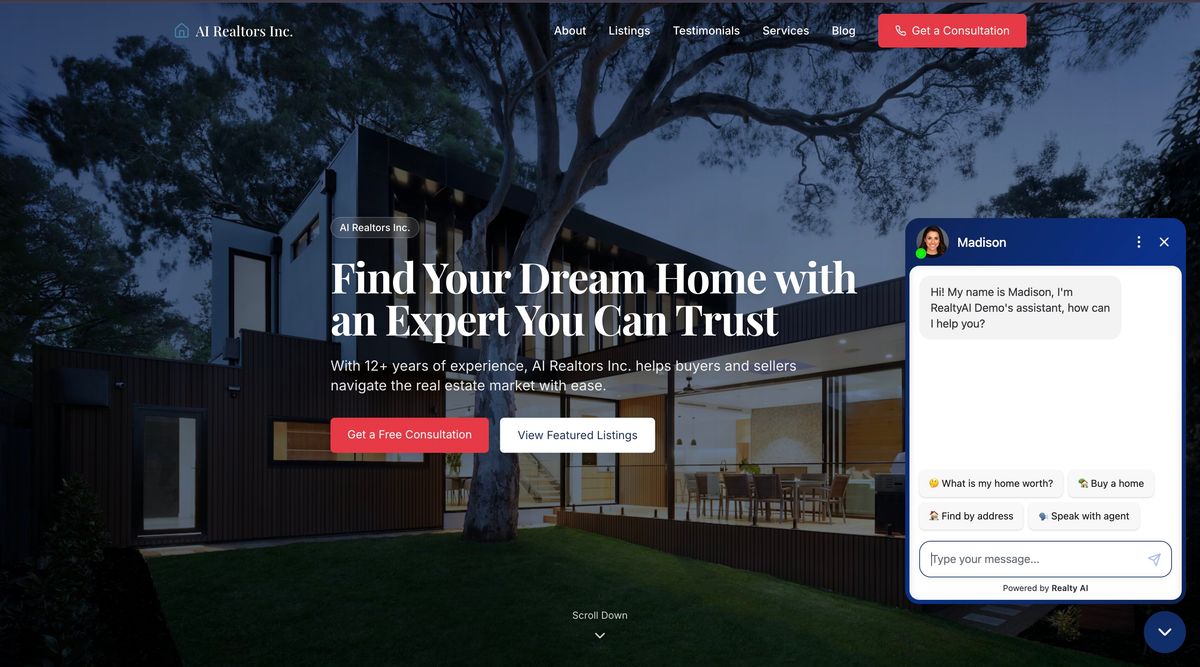
Step 2: The chatbot reads their opening message and identifies the intent. It understands meaning, not just keywords. "What's my house worth" gets routed into a seller qualification flow. "Can I see this place this weekend?" launches the buyer showing-request flow.
At Realty AI, we use predictive messaging bubbles to make answering questions easier
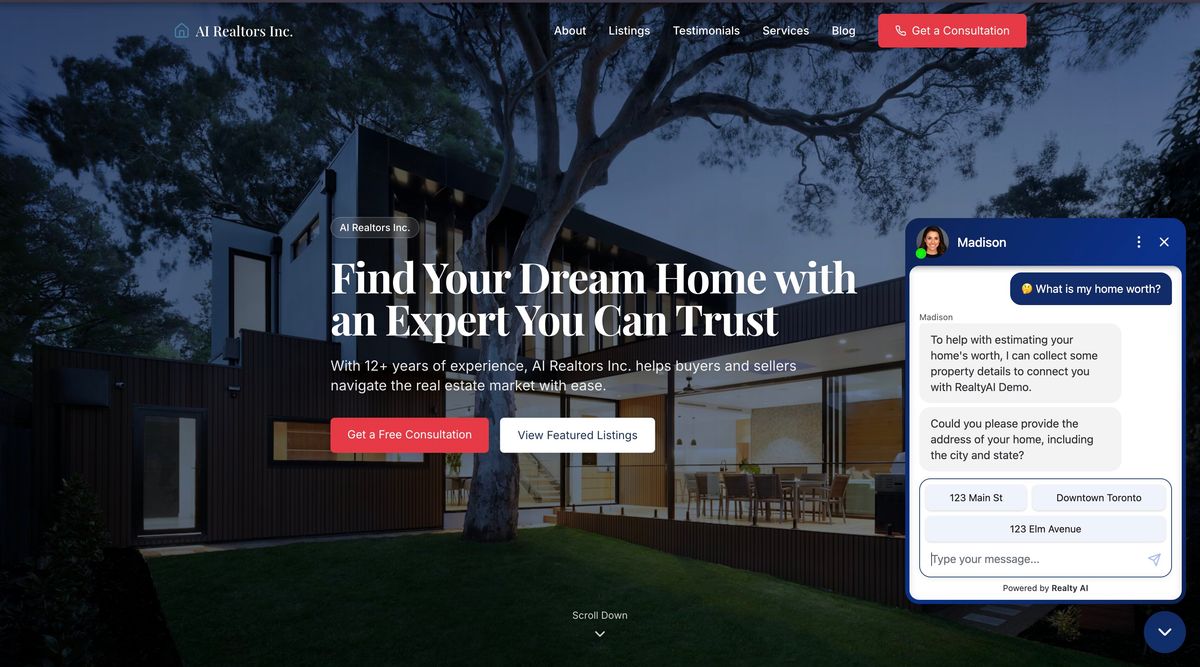
Step 3: It asks the right qualifying questions. Timeline, budget, pre-approval status, property preferences, whether they're working with an agent. Each question feels like a natural next step in the conversation, not a form with required fields.
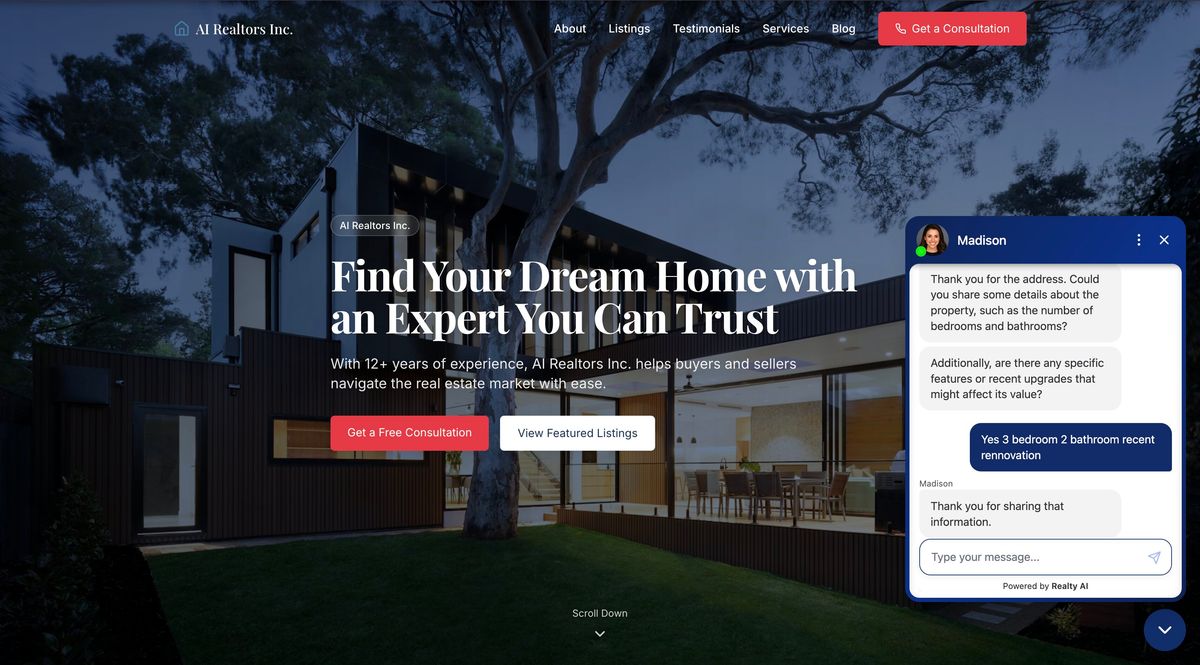
Step 4: It captures contact details mid-conversation. Usually at the point where the visitor has already invested enough in the exchange that sharing their name and email feels like a natural conclusion.
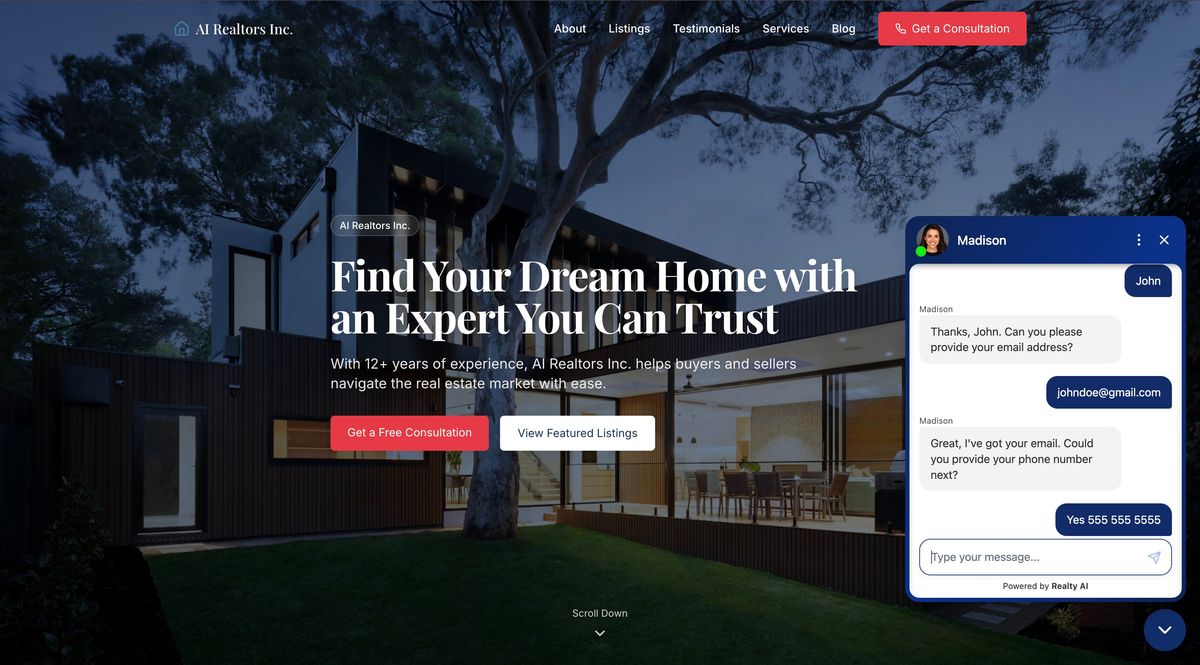
Step 5: The lead and full conversation transcript push to your CRM automatically. The agent gets a real-time notification. By the time they look at their phone, they already know who this person is, what they want, and how urgent it is.
Step 6: If a showing or call is requested, it books directly to your calendar. No back-and-forth, no "what times work for you" thread. The slot is claimed, confirmations go to both parties, and the appointment is set.
How a Chatbot Understands What Someone Is Really Asking
The plain-language version
When a visitor types a message, the chatbot reads the full meaning of what they wrote, not just individual words.
Based on their answers they start by identifying whether they are a buyer or seller
- Listing Inquiries: Recognizes property-specific questions (e.g., "Still available?") to provide immediate, relevant status updates.
- Tentative Sellers: Detects hesitant language (e.g., "Thinking about selling...") to initiate a low-pressure, discovery-focused dialogue.
- Active Buyers: Extracts specific criteria like budget and location from natural speech, following up with targeted questions on timing.
The technical version
Real estate chatbots built on large language models (LLMs) process visitor messages through a natural language understanding layer that classifies intent and extracts structured data from unstructured input. Each incoming message is analyzed against a set of intent categories:
- Buyer inquiry
- Seller lead
- Showing request
- Pricing question
- Agent contact
The model uses entity extraction to pull out specific variables such as property addresses, budget ranges, neighbourhood references, and timeline signals. Those variables are then used to create a lead profile in real time.
What You Can Load Into It About Your Business
Setting up a chatbot requires giving it the context it needs to represent you accurately.
That typically includes:
- Your active listings, price ranges, and featured properties
- The neighbourhoods and geographic areas you serve
- Your team structure, including who handles buyers, who handles sellers, and which areas each agent covers
- Answers to the questions buyers and sellers most frequently ask (commission, process, timelines, local market conditions)
At Realty AI we do the heavy lifting for you by configuring it already. We still do provide some options for further context so it can better align to your business.
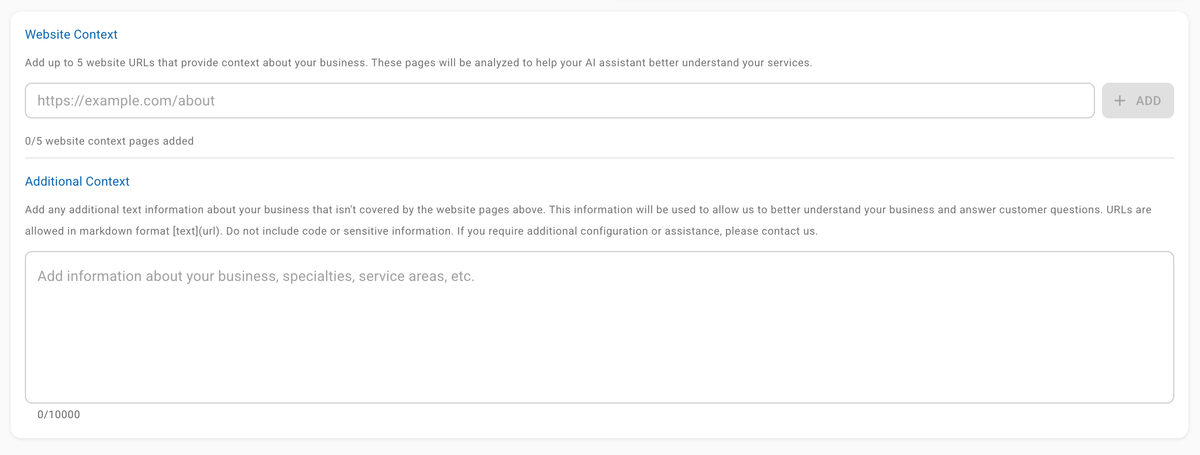
How It Connects to Your CRM and Calendar
When a lead completes a chatbot conversation, their contact details and the full conversation transcript push automatically into whichever CRM your team uses such as Follow Up Boss or KVCore.
At Realty AI we support the major real estate CRMs but also provide a Zapier or Webhook for more niche CRMs. Either way you will receive an email and/or text with every new lead.
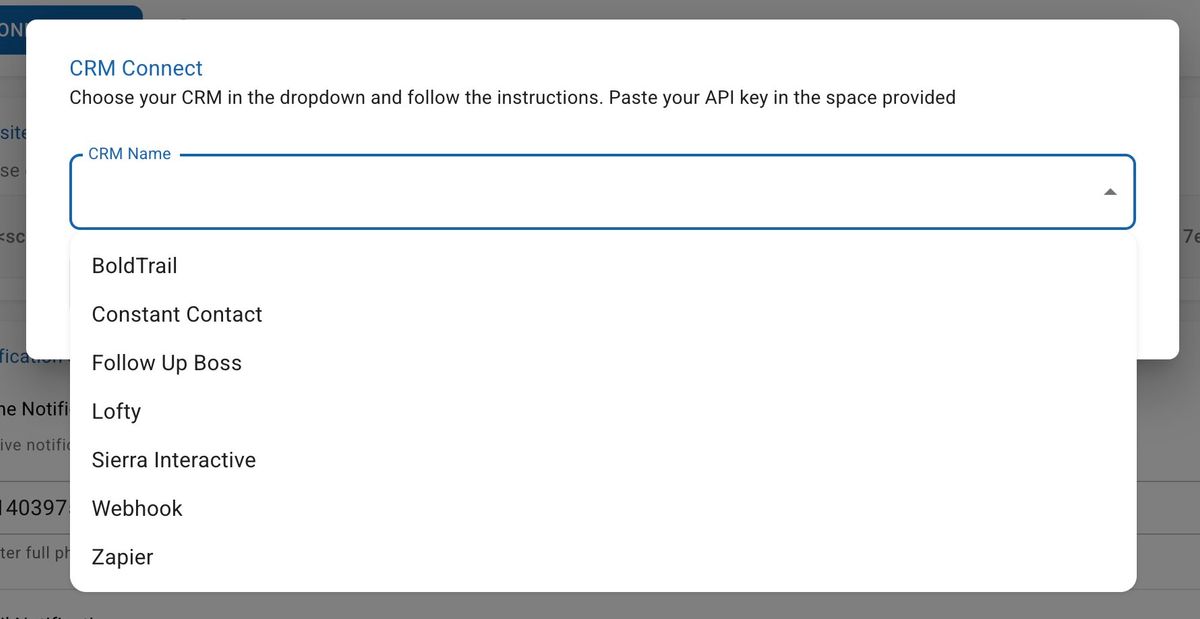
When a showing is booked, it goes directly into the agent's calendar. The visitor picked the slot, confirmed it, and both parties received a confirmation.
At Realty AI you can upload your calendar link directly into our Dashboard so that it syncs with other locations where you have it listed such as your Google My Business Profile.
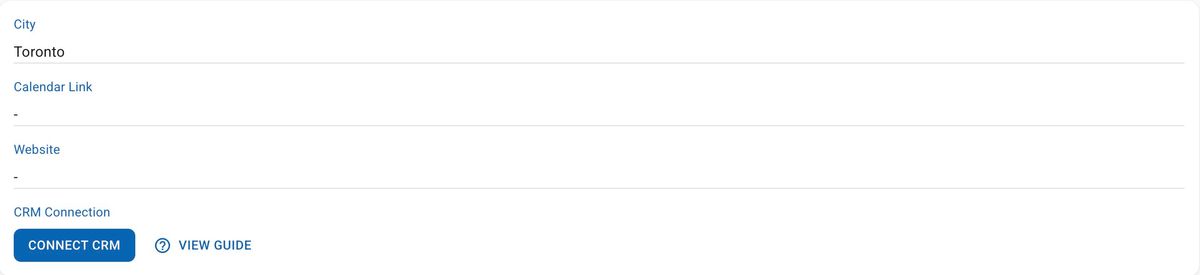
The agent opens their CRM to find qualified leads already tagged and ready to call. The goal of a good CRM integration is to ensure that the chatbot works with the tools your team already uses instead of adding another tool they need to manage.
What the Chatbot Does Before a Lead Reaches You
By the time a chatbot conversation reaches an agent, the work is already done. The visitor has been identified as a buyer or seller, their intent and urgency have been captured, their contact details are in the CRM, and they've either booked a time to talk or expressed a clear next step.
Here's what that intake process looks like in practice.
Qualifying Buyers Without Manual Intervention
A buyer qualification flow through a chatbot typically moves through these steps:
- Identify the visitor's role. Are they buying, selling, or renting? This determines every question that follows.
- Establish timeline. Are they looking to move within 30 days, 3 months, or "sometime this year"? Timeline is the single strongest predictor of conversion likelihood.
- Capture budget range. A conversational question ("What price range are you thinking?") works better than a dropdown.
- Identify property preferences. Type, size, neighbourhood, must-haves.
- Capture contact details. By this point, the visitor has invested in the conversation. Sharing their name and number feels like a natural conclusion.
Capturing Seller Leads With Enriched Data
A seller qualification flow through a chatbot typically moves through these steps:
- Identify the visitor's role. Are they buying, selling, or renting? This determines every question that follows.
- Establish timeline. Are they looking to move within 30 days, 3 months, or "sometime this year"? Timeline is the single strongest predictor of conversion likelihood.
- Understand property details & location. A conversational question ("What price range are you thinking?") works better than a dropdown.
- Capture contact details. By this point, the visitor has invested in the conversation. Sharing their name and number feels like a natural conclusion.
Key Benefits of a Real Estate Chatbot
1. 24/7 lead capture without added headcount
The chatbot runs overnight, on weekends, and during showings. This allows you to maintain an "always on" presence even when you aren't.
Based on our State of Real Estate Conversations report, 40% of leads capture occur outside standard working hours.
2. Higher-quality leads before the first phone call
Every lead that reaches an agent has already been qualified. You know their timeline, budget, property preferences (in the case of a buyer), property details (in the case of a seller) and contact details before you pick up the phone.
3. Faster response time at the moment it matters most
Leads contacted within one minute are 391% more likely to convert. The chatbot responds in seconds, not hours, which means the window stays open long enough for the agent to call while the lead is still warm.
Each time Madison collect's a leads contact information you automatically receive an email and/or text with the details and a conversation summary so you can respond within seconds with the right context.
4. Automatic consultation bookings
Leads can book consultations, once they ahve been qualified, directly through the chatbot without any back-and-forth. The appointment lands on the agent's calendar with the buyer's full qualification notes attached.
This real time feedback allows the lead to know that the agent will respond to them while still giving you time to prep for the meeting reducing their need to contact other agents.
5. Consistent first response across a whole team
For brokerages and teams, that have a very strong website traffic, the chatbot ensures every website visitor gets engaged regardless of which agent is available.
When website visitors get engaged, the experience feels like an extension of your brand instead of a disconnected chat.
6. Cleaner pipeline data
Every conversation is logged and tagged. Team leaders can see exactly where leads are coming from, how they're progressing, which conversations converted and what their leads are actually looking for.
Madison's data is predictive of where the market is going as it involves conversations with real people before they make transactional decisions which show up and get reported on inthe public MLS systems.
Not All Real Estate Chatbots Work the Same Way
Rule-Based Chatbots
Rule-based chatbots follow a fixed decision tree. The visitor clicks a button, gets a pre-written response, clicks another button, and so on.
They're predictable and easy to set up, but they break the moment someone types something outside the script.
In real estate, where buyers ask everything from "is the basement finished?" to "what's the school catchment here?", a rigid script falls short fast.
Keyword-Matching Chatbots
Keyword chatbots scan incoming messages for trigger words and return a pre-set response when they find a match. Type "price" and you get the pricing FAQ. Type "viewing" and you get the booking link.
The problem is that real questions rarely use the exact keyword the bot is looking for. "What would this run me monthly?" doesn't trigger "price."
These chatbots generate a lot of "I didn't understand that" responses, which erodes trust and kills the conversation.
AI-Powered Conversational Chatbots
AI chatbots built on large language models understand the meaning of a message, not just the words. They handle follow-up questions, ambiguous phrasing, and multi-part requests the way a person would.
In real estate, this matters because buyer and seller conversations are inherently unpredictable. An AI chatbot can move from "what's the square footage?" to "is there a school nearby?" to "how do I book a showing?" within the same conversation, without losing the thread.
Purpose-built real estate chatbots like Madison go further by combining conversational AI with real-estate-specific qualification flows, CRM integration, and business context.
Why a Lead Form Can't Qualify Leads as Effectively
A lead form is passive. It waits for someone to decide to fill it out and asks everyone the same questions. It doesn't account for each unique situation.
In 99% of situtaions a form only gives you a name, email and phone number. On the otherhand, a chatbot gives you a name, a phone number, a timeline, a budget, and either a list of neighborhoods they are interested in highly specific property details for a sale.
Going even further, Realty AI's conversation data shows that over 60% of all chatbot conversations are transactional in nature: property search (24.8%), agent contact (15.9%), pricing inquiries (12.3%), and property details (11.6%).
These are people in the middle of active buying decisions but a form could never know this information and instead you would have to waste time figuring it out.
How Teams and Brokerages Use It Differently Than Solo Agents
For a solo agent, a chatbot solves an availability problem. For a team or brokerage, it solves a qualification and customization problem.
Qualifying > Capturing
Most brokerage or high performing team sites typically see 10,000 - 20,000 monthly sessions. At this level of traffic the issue is not whether you will get leads. Its will you get the right leads?
This is where the contact form really starts to fail as you have two options
- Your form is very basic: The lead will fill it out but then your team needs to spend the time qualifying them.
- Your form asks more qualifying questions: The lead will likely bounce as it feels too invasive answering all these questions.
If you choose to skip the form and pay a staff member to manually filter every lead, you're missing a major opportunity for growth. That same budget could be much more effective if reinvested into:
- Recruiting top-tier agents
- Driving more targeted website traffic
- Refining the systems that actually drive your revenue.
AI chatbots have the biggest ROI with websites that have strong traffic already, as they deliver a lead capture system that works 24/7 without the fatigue or overhead of a human team.
Consistent Branding
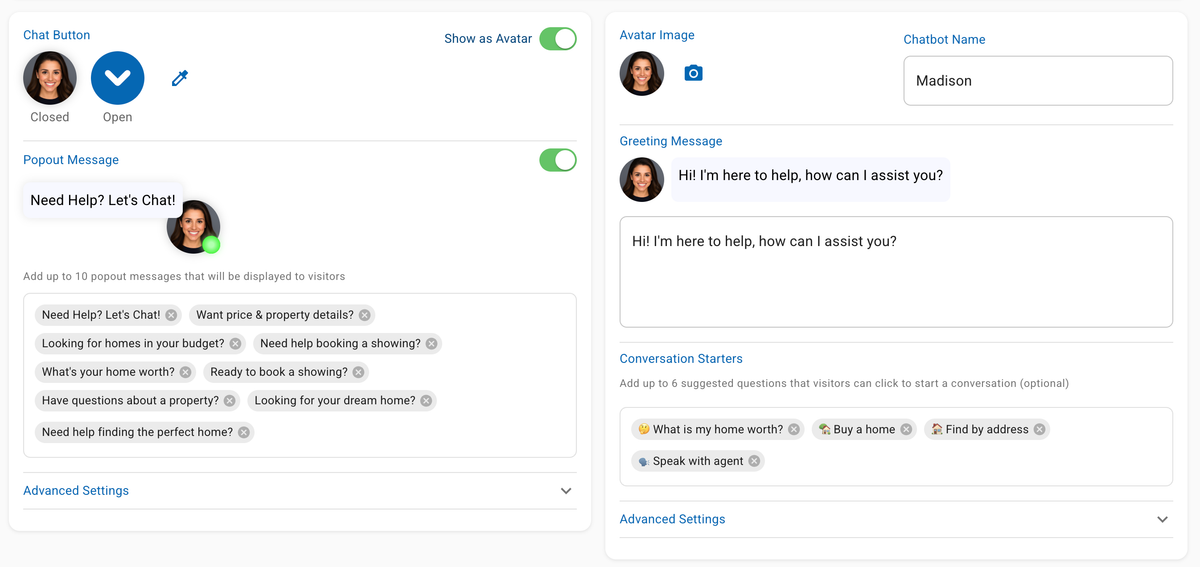
Madison is configured to speak like your team, not like a generic AI assistant.
That means setting the tone, the opening message, and the conversation style to match how your brand actually communicates.
Specific customization options include:
- Custom avatar using a team logo or agent headshot
- Branded opening message and conversation starters based on real client questions
- Popup timing controls so the chatbot surfaces at the right moment in a visitor's session
- Service descriptions for each part of the business with links to relevant pages
- Multi-lingual support so brokerages serving diverse markets can engage visitors in their preferred language
When the Chatbot Steps Aside and a Human Takes Over
What happens when someone has a complicated situation, like a divorce, an estate sale, or a client who's grieving?
A well-configured chatbot doesn't try to handle those situations. It recognizes the signals that mean "this person needs a real agent now," including emotional language, legal complexity, and repeated escalation requests, and it routes the conversation immediately.
The agent gets a real-time notification with the full conversation transcript attached. They pick up where the chatbot left off, without asking the prospect to repeat themselves.
When the agent does step in, it's a better conversation because the chatbot already did the qualifying work that would have otherwise happened on the first phone call.
Why Realty AI Is Different From Other Chatbots
Most chatbots are general-purpose tools. They were built for e-commerce, customer support, or SaaS businesses, and then pointed at a real estate website.
That creates a real problem.
General chatbots require extensive configuration before they're useful which involve you writing the conversation rules, defining the intent categories, building the qualification flows, and seting up the routing logic yourself.
Then you maintain all of it as your business changes.
If a new listing type comes up, a new service gets added, or buyer behaviour shifts, someone on your team has to go back in and update the rules manually.
Madison Is Built Specifically for Real Estate
Madison arrives already trained on real estate. She understands buyer intent, seller intent, rental inquiries, pricing questions, showing requests, and neighbourhood searches, while accommodating for the fair housing act, without any rule-writing on your part.
That real estate knowledge is built in from day one, not something you need configure over months of trial and error.
No Maintenance Required
With most chatbots, the tool is only as good as whoever maintains it. Flows go stale, edge cases break, and the gap between what the bot can handle and what visitors actually ask widens over time.
Realty AI handles all of that for you. Madison is continuously updated to reflect new real estate conversation patterns, market shifts, and AI improvements.
You don't touch it. It just keeps working.
Live in 5 to 10 Minutes
Most chatbot deployments take weeks. There's a discovery phase, a build phase, a testing phase, and a go-live phase, each with back-and-forth between the agent and a your IT department.
Madison is different. Because the real estate knowledge and qualification flows are already built in, setup is a matter of adding your custom code snippet, connecting your CRM, and optionally adding some custom instructions for unique elements of your business.

The Conversation Your Website Should Be Having Right Now
Every agent's website is already receiving potential clients. The only question is whether your website gives them something to engage with.
A chatbot doesn't close deals. It makes sure you get to have the conversation.
It qualifies, schedules, and captures at the exact moment a motivated buyer or seller is on your site and ready to talk.
Book a Demo Today to explore how we can get you an addition 20-40 qualified leads from your existing web traffic.
See it in action
Ready to engineer your lead gen?
See how Madison qualifies, books, and routes leads in 2 seconds, across every page on your site.