16 Gemini Real Estate Prompts for Market Reports, Visuals, and Google Workspace
The Gemini real estate prompts worth saving are the ones that play to what Google actually built: market data you can reason over, images you can generate and edit, and a side panel that already sits inside the file you are working in. Below are 16, weighted toward reporting and visuals.
Nathan SmithPublished Sep 3, 2026Updated Sep 3, 202612 min read
Listing copy and follow-up texts are where most AI prompts for real estate agents stop, and they are also the tasks any model handles competently.
The gap worth exploiting is analysis and visuals, because that is where Gemini's Workspace integration does something a chat window cannot.
Here's what we'll cover:
The reporting still has to reach someone, which is the job a real estate AI chatbot does on the listings you already publish.
Let's get started.
Gemini app or Workspace side panel
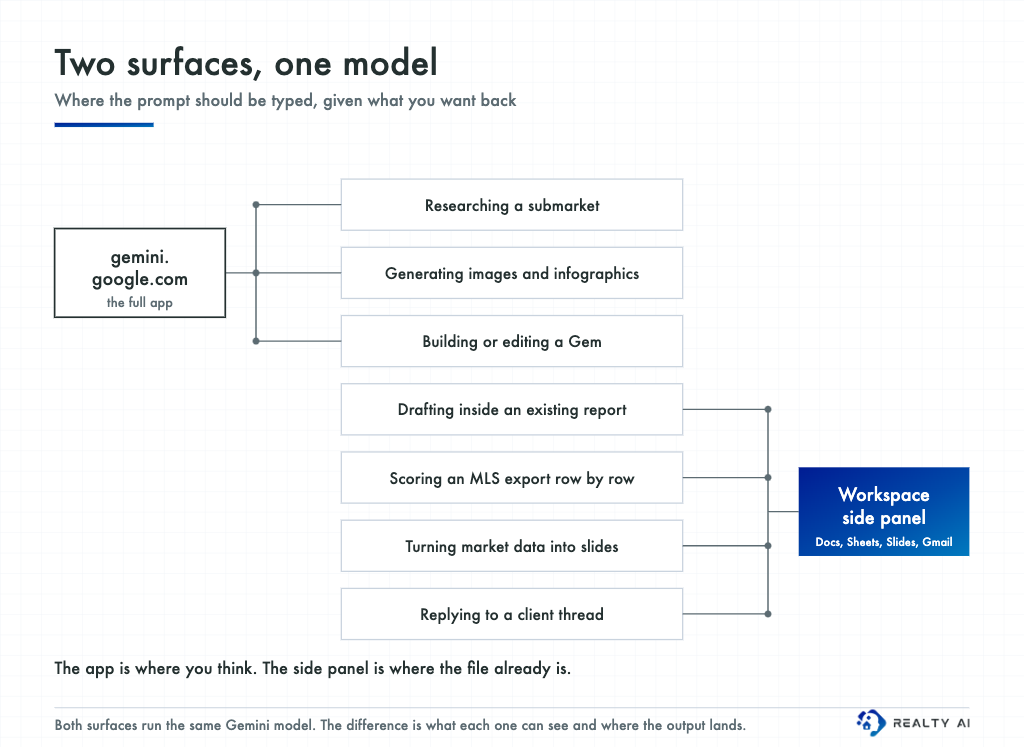
This is the first decision, and it changes the prompt more than the wording does. Both surfaces run the same model, but they differ in what they can see and where the output lands.
Job
Surface
Why
Researching a submarket
Gemini app
Deep Research plans, searches, and cites
Generating or editing images
Gemini app
Full image model, multi-turn refinement
Building a Gem
Gemini app
Gems are created and edited there, then appear everywhere
Drafting inside an existing report
Docs side panel
Reads the open document, inserts in place
Scoring an MLS export
Sheets, via =AI()
Runs down a column instead of one answer at a time
Turning data into slides
Slides side panel
Generates and inserts the visual directly
Replying to a client thread
Gmail side panel
Reads the thread, drafts in the reply box
The rule of thumb: the app is where you think, the side panel is where the file already is. If your prompt begins with pasting a large block of data, you are probably in the wrong surface, because the side panel can read what is already on screen.
These prompts assume Workspace is connected and the side panel is switched on, which is covered in using Gemini for real estate.
Why most Gemini prompt lists were written for ChatGPT
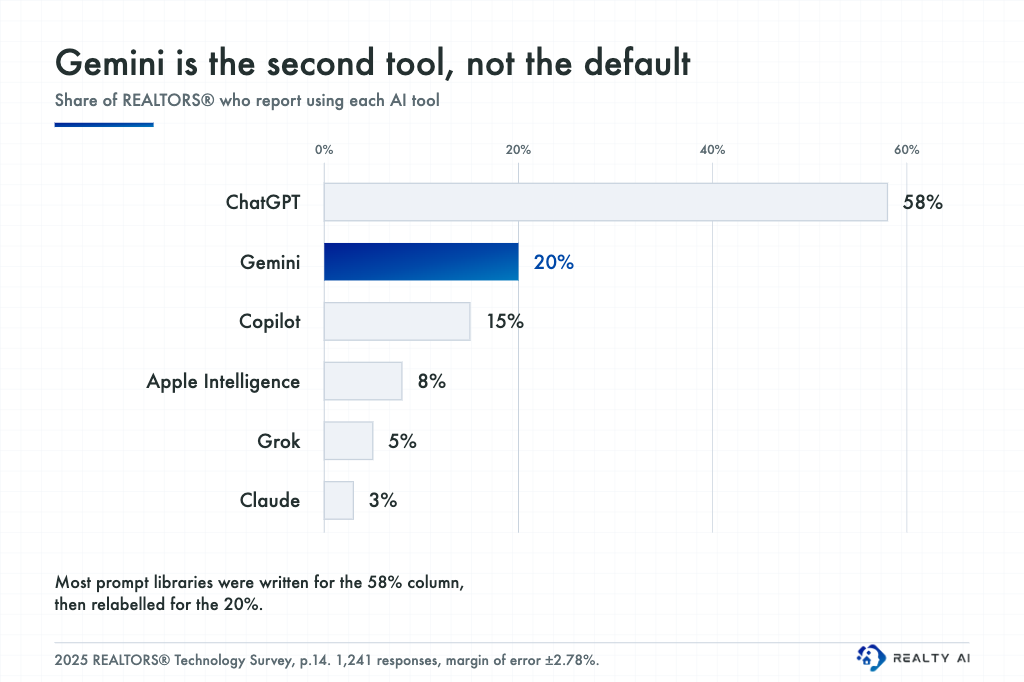
Gemini is the number two AI tool among agents, and that shapes every prompt library you find. NAR's 2025 Technology Survey put ChatGPT at 58 percent of REALTORS®, Gemini at 20 percent, and Copilot at 15 percent.
Roundups get written for the 58 percent column and retitled for the 20 percent, which is why they read as generic chat prompts.
None of the Workspace surfaces above exist in ChatGPT, so none of them show up in a relabelled list.
Where that platform is genuinely stronger, it deserves its own set of ChatGPT prompts for real estate agents rather than a Gemini list with the name swapped.
The same survey found 46 percent of REALTORS® reported no noticeable impact from AI at all, against 17 percent who called it significantly positive.
That gap is usually a context problem, not a tooling one, and it is worst on analytical tasks where the model was given a question but not the numbers.
The structure every prompt below uses
Role. Who Gemini is. "You are an appraiser reviewing comps in [SUBMARKET]."
Task. One goal, stated plainly.
Context. The actual data, pasted or referenced. On market work this is the step that decides whether the output is usable.
Format. Word count, structure, tone, how many variants.
Market report and CMA prompts
1. The monthly neighbourhood update
Plain text
You are a listing agent in [NEIGHBORHOOD] writing to homeowners
on that block.

Here is this month's MLS data, with prior month and prior year:
[PASTE: median price, DOM, active inventory, months of supply,
list-to-sale ratio, closed units, new listings]

Write a 250-word update explaining what these numbers mean for
someone deciding whether to list this spring.

Rules:
- One number per paragraph, each with the "so what"
- Describe the market and the housing stock, never the residents
- Flag any figure that looks anomalous rather than smoothing it
- If a conclusion needs data I did not give you, say so instead
  of estimating
2. The CMA narrative
Plain text
Turn this CMA into a two-page explanation a first-time seller
can follow.

[PASTE SUBJECT PROPERTY AND COMPS WITH ADJUSTMENTS]

For each comp: why it was selected, how it was adjusted, and how
much weight it deserves. Where a comp is weak, say so plainly.

End with the recommended list price range and the two assumptions
that would move it most.
3. Pricing conversation prep
Plain text
My seller wants $[X]. My comps support $[Y].

Prepare my side of that conversation: the three strongest data
points for my number, the two fair points in their favour, and
the one question I should ask before presenting anything.

I want the argument structure, not a script.
4. Submarket research with citations
Use Deep Research in the Gemini app for this one. It plans, searches, and cites as it goes.
Plain text
Research everything published in the last 9 months about
development approvals, zoning changes, school boundary changes,
transit projects, and major employer moves in [CITY/SUBMARKET].

For each finding: what happened, the date, a source link, and one
sentence on the plausible effect on residential values.

Separate confirmed decisions from proposals. List anything you
could not verify in its own section.
Open the citations before any of this reaches a client. A cited claim you have not clicked is still an unchecked claim.
5. Reading absorption honestly
Plain text
[PASTE: active listings, pending, closed last 6 months by month,
for PROPERTY TYPE in SUBMARKET]

Calculate months of supply for each month and show your working.
Then tell me, in three bullets, what the trend line actually
supports and what it does not support.

Push back on me if I am reading a seasonal pattern as a trend.
6. The investor one-pager
Plain text
You are a commercial analyst. Here is a small multifamily deal:
[PASTE: price, units, rent roll, T-12 expenses, taxes, vacancy]

Produce a one-page summary: cap rate, NOI, cash-on-cash at 25%
down and [RATE]%, and the three assumptions the return is most
sensitive to. Show the formula behind each figure.

State clearly that this is analysis, not investment advice.
Treat every number it returns as a draft. Gemini has no MLS or public records connection, so it only knows what you pasted in.
The financing side of the same deal runs on different vocabulary, which is where these AI prompts for mortgage brokers pick up.
Running market prompts as spreadsheet formulas
This is the Workspace feature almost no prompt roundup covers, and it is the most useful one for market work.
Google Sheets now takes a prompt as a formula: =AI("prompt", range), or =Gemini(), which means one prompt can run down a whole MLS export instead of answering once.
7. Classify every comp in the export
Plain text
=AI("Classify this listing as a strong, moderate, or weak comp
for a 1,900 sqft 1920s foursquare on a 40x125 lot. Answer with
one word and a five-word reason.", A2:H2)
8. Summarise the agent remarks column
Plain text
=AI("In one sentence, what does this listing's agent remarks
field tell a buyer's agent about the seller's motivation and the
property's condition?", J2)
9. Flag copy that needs a compliance read
Plain text
=AI("Does this listing description contain any phrase a reader
could take as describing a preferred type of buyer rather than
the property? Answer FLAG or CLEAR, then quote the phrase.", K2)
Three limitations from Google's own documentation are worth knowing before you build a sheet around this.
The function cannot see your whole spreadsheet or anything in Drive, so you have to pass the range explicitly.
Only the first 350 selected cells generate at once, and you cannot nest the function inside an IF or undo a generation.
That first constraint is the one that bites.
“
A prompt that says "compare this to the neighbourhood average" returns nothing useful unless the neighbourhood average is a cell inside the range you passed.
Anyone running a rent roll across a portfolio gets more from this than a single-listing agent does, and the same row-by-row thinking drives these AI prompts for property managers.
Visual prompts
Gemini generates and edits images natively, and the Workspace versions insert straight into the file.
In Slides, "Help me visualize" and "Beautify this slide" produce infographics and layouts you can insert as a new slide.
10. Market infographic in Slides
Open the Gemini side panel in Slides and use "Help me visualize."
Plain text
Create a clean infographic slide for a Q3 market update in
[NEIGHBORHOOD].

Four data points: median price $[X] (up [Y]% YoY),
[Z] days on market, [N] months of supply, [P]% list-to-sale.

Editorial style, one accent colour, generous white space, no
stock-photo people, no icons of houses. Landscape 16:9.
Check every figure in the generated image before it leaves your laptop. This is the failure mode Google itself flags, and it is covered further down.
11. Read the listing photos
Plain text
Here are 14 photos of a listing I am taking to market.

For each room, describe only what is visible: materials, finishes,
light, condition, layout. Flag anything that looks like a recent
renovation and anything a buyer is likely to object to.

Then rank the photos for listing order and explain the top three
choices. Do not invent features you cannot see.
12. Staging concepts from an empty room
Plain text
This is an empty living room. Show it staged three ways:
mid-century, warm traditional, and minimal.

Keep the architecture, windows, flooring, ceiling height, and
dimensions exactly as they are. Furniture and decor only.
13. Agent headshot cleanup
Plain text
Using this photo of me, produce a professional headshot: neutral
background, even lighting, natural skin texture, business casual.

Keep my face unchanged. Square crop, suitable for a listing
presentation and MLS profile.
14. Just Sold graphic
Plain text
Design a "Just Sold" graphic for a [PROPERTY TYPE] in
[NEIGHBORHOOD]. Clean editorial layout, one photo placeholder,
the sale metric prominent, space for a logo bottom right.

Give me a 4:5 version for Instagram and a 16:9 for email.
Two prompts for the tasks everyone else covers
Listing copy and follow-up are commodity work, so here is one of each rather than ten.
15. MLS description
Plain text
Write a 180-word MLS description for:
[PASTE: beds, baths, sqft, lot, year built, updates, standout
features, HOA, named schools, walk score]

Lead with the most unusual feature, not the bed and bath count.
Describe the property and the location only, never the buyer it
would suit. No superlatives without a fact behind them, and no
"nestled," "boasts," or "must see."

Three versions with different opening lines.
16. Reviving a cold lead
Plain text
Write a text to a lead who inquired 5 months ago about [PROPERTY
TYPE] and went quiet after two replies.

Under 45 words, no "just checking in," reference one specific
market change since they last looked, end with a question they
can answer in three words. Four options at different levels of
directness.
If short-form outreach is the bulk of your AI use, run these two prompts against Claude for real estate as well before committing to one subscription.
Save your best prompt as a Gem
Once a prompt works twice, stop pasting it.
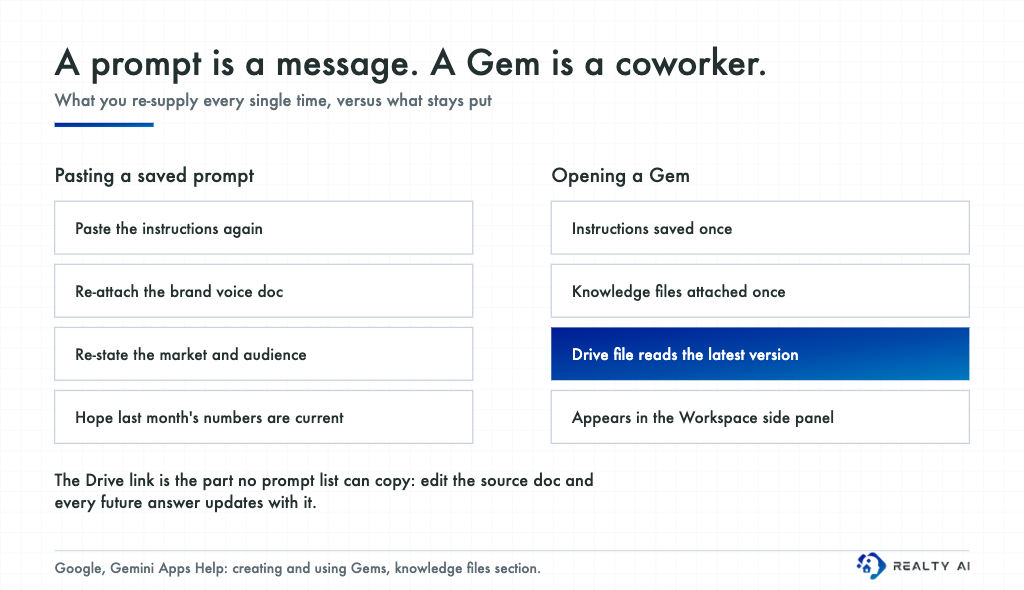
A Gem is a saved configuration of Gemini with standing instructions and attached knowledge files, and it is the piece that connects the app to the Workspace surfaces: build it once at gemini.google.com and it appears in the side panel in Docs, Sheets, and Gmail.
The detail that matters for market reporting is the Drive connection.
Per Google's documentation, when a Gem's knowledge file comes from Drive, Gemini uses the most recent version, so edits to the source document flow into every later response.
For an agent doing monthly reporting, that means one "Market Report" Gem with your submarket definitions, your report template, and your standing methodology notes attached from Drive.
Update the methodology doc once and every subsequent report follows it, without editing the Gem or re-pasting anything.
Two more Gems cover most of the rest: one for visuals, holding your brand colours and layout rules, and one for client communication holding your voice guide.
Every major platform has a version of this now, and Claude Projects for real estate shows the same saved-context pattern with a different set of trade-offs.
The fair housing layer prompt lists skip
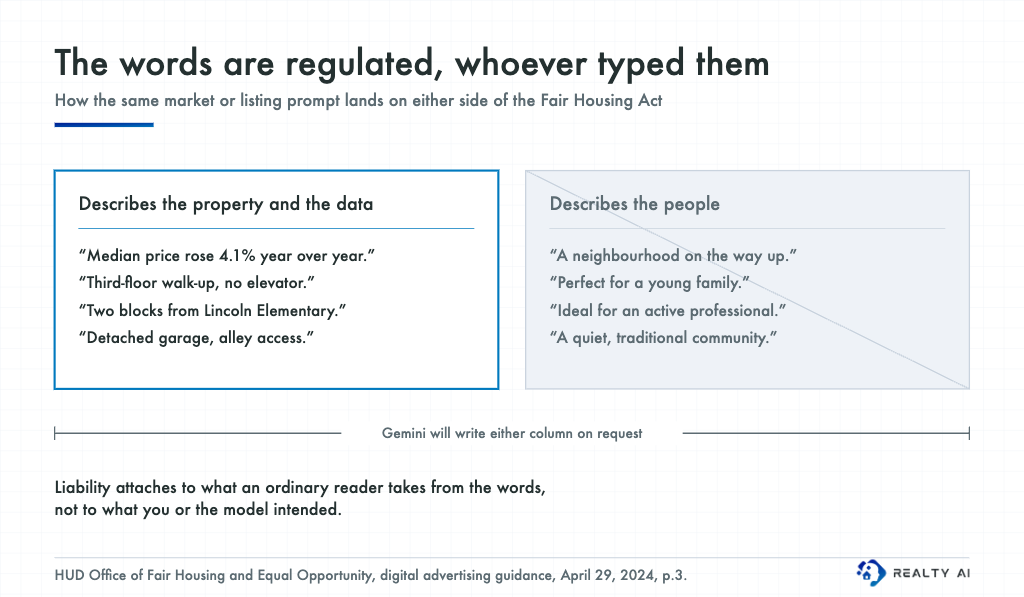
HUD's regulations implementing the Fair Housing Act prohibit words, phrases, photographs, illustrations, or symbols conveying that a dwelling is available or unavailable to a particular group because of a protected characteristic, and courts apply that through what an ordinary reader would take from the advertisement, whether or not anyone intended to discriminate.
Market commentary is exposed here too, not just listing copy.
Ask for a warm, optimistic neighbourhood summary and Gemini will reach for phrasing like "a neighbourhood on the way up," which describes who is arriving rather than what is selling.
Put the check in the Gem so you are not relying on remembering it:
Plain text
Never characterise the residents or the type of buyer or tenant a
property or area would suit. Describe the property, the housing
stock, the amenities, and the data only.

Do not reference family status, age, religion, national origin,
disability, or a nearby religious institution as a selling point.
Flag any phrase an ordinary reader could take as signalling a
preferred type of buyer.
None of this is legal advice, and requirements vary by state and municipality. Run your templates past your broker or counsel before they go into production.
Where AI visuals and data go wrong
One honest limitation, since visuals are half of this list.
Google's own model documentation warns that when generating infographics, annotating diagrams, or representing complex data, the image model may misinterpret information or produce factually incorrect results, and advises verifying data-driven outputs.
That is a direct warning against the most tempting use case in this post, which is handing your market numbers to an image model and publishing what comes back.
Generate the layout, then check every figure against your source spreadsheet, because a transposed digit in an infographic travels further than one in a paragraph.
Generated images also carry a SynthID watermark, and several MLSs now require disclosure of AI-altered listing imagery.
Check your local rules, since the obligation sits with you rather than with the platform.
Frequently asked questions
What are some effective AI prompts for real estate agents?
The effective ones share a structure rather than a topic: a defined role, one task, real data pasted or referenced, and an explicit output format.
On market work specifically, a prompt containing your actual MLS export will beat any cleverly worded prompt that contains none.
What prompts are people giving to Gemini?
Across all users the heaviest volumes are image generation and editing, followed by writing and research.
Among agents, listing descriptions dominate, which tracks with NAR finding that 46 percent of REALTORS® use AI-generated content in their business.
Can Gemini pull live MLS data?
No. There is no MLS connection in either the app or the side panel, so it works from what you paste, upload, or reference in the open file.
Export your comps yourself and treat any figure Gemini produces from memory as unverified.
Do I need a paid plan for these prompts?
The chat and image prompts work on the free tier with lower limits.
The =AI() function in Sheets and the Gemini side panel across Workspace apps require an eligible Workspace or Google AI plan.
Should I use Gemini or the Workspace side panel for market reports?
Draft in the Docs side panel when the report already exists, since it reads the open file and inserts in place.
Use the app for the research phase, and use Sheets for anything you need repeated across every row of an export.
The Bottom Line
Gemini earns its place in a real estate workflow on analysis and visuals rather than copywriting, and most of that value sits in Workspace rather than the chat window.
Save the prompts that work as a Gem, put the fair housing instruction at the Gem level, and check every number before it reaches a client.
Better market reporting only pays off if buyers reach you, so book a demo of Realty AI and see how it captures and qualifies the visitors already on your listings.
Related articles
More in AI 101
Keep reading in the same category to go deeper on the topics that matter to your team.
Gemini vs Claude for real estate agents, compared task by task: listings, market research, contract review, cost, and the verification step both tools need.
How to use Gemini for real estate inside Google Workspace: draft email in Gmail, build listings in Docs, analyze deals in Sheets, and make client decks in Slides.
Claude Projects for real estate: build persistent workspaces per client, listing, or farm area, with standing instructions, brand voice, and copy-paste prompts.
About Madison
The AI assistant built for real estate lead gen
Madison is Realty AI's conversational assistant for real estate websites. It engages visitors instantly, qualifies buyers, sellers, and renters through natural dialogue, routes summaries to your CRM, and keeps your team focused on closing.
5.0 average from 2,500 customer reviews
“We captured 3 new transactions worth over $3.3 million in just a few months using Realty AI.”
Sarah Logue
Broker & Owner, Top 0.1%
“Within our first week of using Realty AI, I had an engaged seller ready on the phone. This has never happened before in 4 years.”
Mark Jensen
Owner & Broker of Record
“It feels like having a personal assistant on my website 24/7, sending me instant notifications so I never miss a potential client.”